
Welcome to the official documentation for Genisoft eBay Sync for PrestaShop 8 and PrestaShop 9. This step-by-step manual covers every screen, setting, and built-in AI workflow.
1. Technical Requirements & Installation
- PrestaShop:
8.0.0to9.x(fully tested on PS 8.2 and PS 9.2). - PHP:
7.4to8.6withcurl,openssl,json, andmbstring. - HTTPS required: eBay requires a valid SSL certificate for OAuth 2.0 redirect callbacks and the mandatory Marketplace Account Deletion endpoint.
- eBay Business Seller Account with Seller Hub Business Policies enabled.
Installation: go to Modules > Module Manager > Upload a module, upload the module ZIP archive, and click Configure. The module automatically creates its tables, the multilingual eBay — To prepare order state, and its internal virtual carrier.
2. Quick Health Check Bar (5 Indicators)
- eBay account connected: turns green as soon as your OAuth 2.0 access & refresh tokens are active.
- 3 business policies: confirms your Shipping, Payment, and Return policies are mapped for the primary marketplace.
- Location key: verifies your eBay Inventory Location is active on eBay.
- Mapped category: turns green once at least one PrestaShop category is mapped to an eBay category.
- Cron active (< 24h): displays the exact timestamp of the last successful automated CRON run.
3. Connection Tab : OAuth 2.0, REST API Credentials & CRON
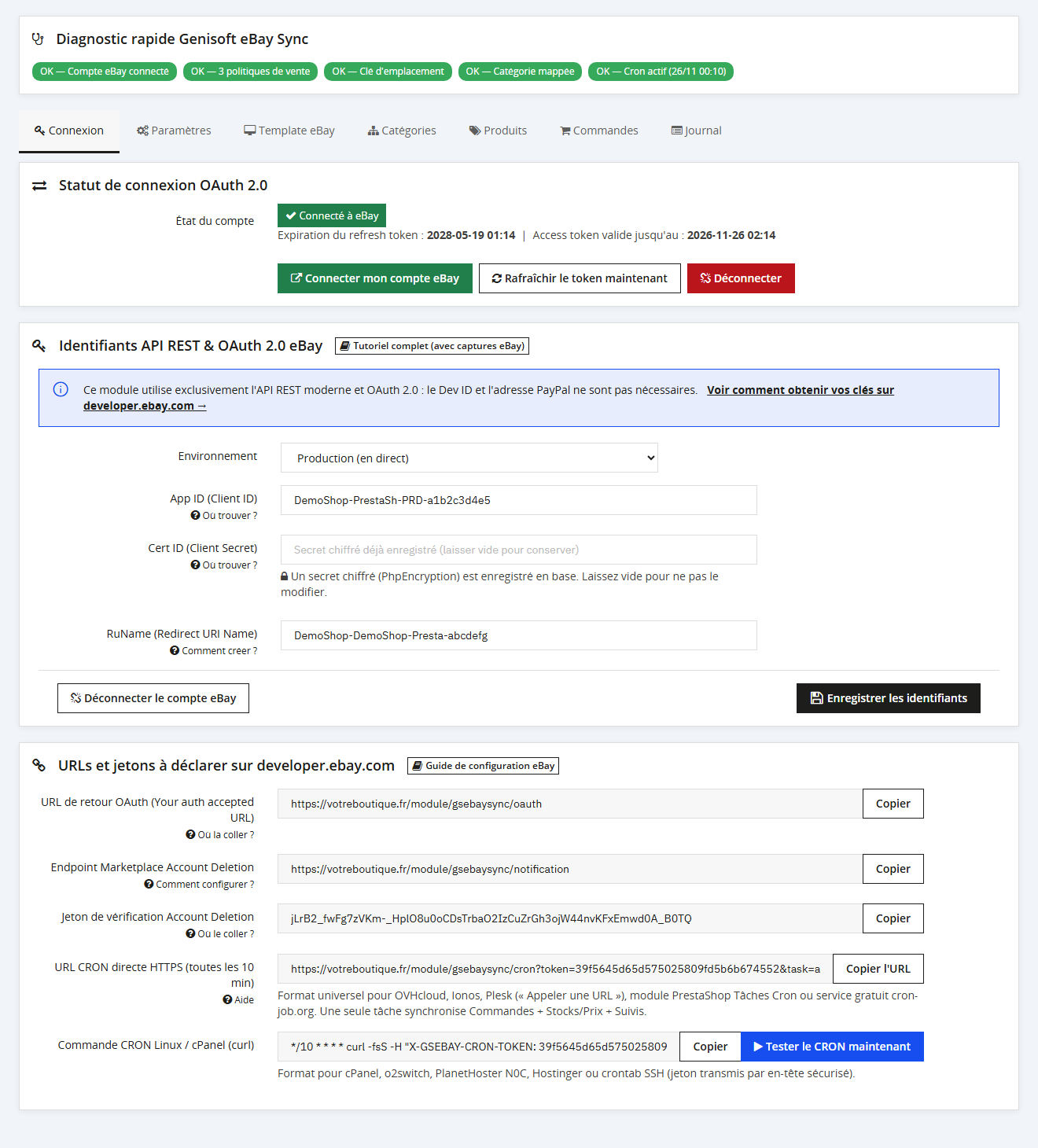
- OAuth 2.0 Status: eBay refresh tokens remain valid for ~18 months, and access tokens (2 hours) renew automatically before every API request. Clicking Disconnect clears tokens without ever deleting your product or category mappings.
- REST API Credentials: select
Production (live)orSandbox (testing), enter your App ID, Cert ID (encrypted in DB viaPhpEncryption), and RuName. No legacy Dev ID or PayPal address is needed. See the developer.ebay.com walkthrough. - Account Deletion Compliance: copy the module's notification endpoint and verification token into eBay Developer Portal (built-in SHA-256 challenge & ECDSA signature verification).
- Single CRON Task: choose either the Direct HTTPS CRON URL (Plesk, OVHcloud, IONOS, cron-job.org) or the Linux / cPanel curl command (passes the secret via
X-GSEBAY-CRON-TOKENheader). Click Test CRON now to run a live cycle (Orders + Queue + Tracking) and verify external HTTP 200 reachability.
Need help getting started?
Our team answers your questions about installing and configuring the module.